14 Package Development
Most R users start writing functions to avoid repeating themselves. The same data cleaning steps appear in three scripts, so they get pulled into a shared helper. That helper gets sourced into a fourth script. A colleague asks for it and it gets emailed. Then it breaks on their machine because they’re missing some dependency. A package provides a standard way to distribute these shared functions.
My general rule is: If you do something more than once, write a function. If you write more than one function, make it a package.
An R package is the right unit of sharing for reusable code. It combines your functions with documentation, a test suite, versioning, and a clear installation path.
This chapter is a brief introduction to R package development. It is not a comprehensive guide, but it will give you the basics and point you to resources for learning more.
14.1 Why build a package?
Copied helper functions are easy to lose track of. If three reports contain their own copy of a county-cleaning function, a correction in one report may never reach the others. With a shared package, the team maintains one implementation, reviews the correction once, and releases an update that each project can adopt.
Writing function documentation makes you decide what callers can expect. For a rate calculation, that includes the denominator units, the treatment of missing values, and the result when the population is zero. Those decisions help a colleague use the function without reading its implementation or asking its author. Package help pages make the answers available through ?your_function, and R CMD check warns about undocumented exported objects. Section 21.3 covers writing that documentation alongside the code.
Declaring dependencies in DESCRIPTION records which packages your code needs. Installation tools use those declarations to install required R packages from the configured sources. A colleague no longer has to reconstruct the set of packages you happened to have loaded when you wrote the helper. The declarations also give reviewers a place to inspect the package’s dependencies and assess the cost of adding another one (Chapter 13).
A package gives the team a repeatable installation procedure. You can distribute it through an internal repository or a Git repository that colleagues can access; publishing on CRAN is optional. Installation puts the functions and their help pages in the expected locations, so each analysis can load the package without setting paths to a shared helper script. New team members can follow the same setup instructions as everyone else.
Shared functions need tests because a change can affect several analyses. A suppression helper, for example, should have tests for counts just below and at the threshold, as well as zero and missing values. Keeping those tests with the package lets you run them before releasing a change. A colleague fixing one case can check whether the other documented cases still work. Chapter 4 covers choosing useful tests and adding regression tests after a bug.
Versioned releases let projects adopt changes deliberately. A report already under review can continue using the version it was checked with while another project tests an update. Record the package version in each project’s renv lockfile and retain access to its source so the environment can be restored (Section 15.1). Declaring dependencies tells users what the package needs; the lockfile records the versions a particular analysis used.
A package still needs someone responsible for reviewing changes, maintaining documentation, and releasing updates. Start with functions that several projects already share, such as common validation checks or reporting helpers. Section 13.9 discusses how to divide that code into packages with a manageable scope.
14.2 The package development workflow
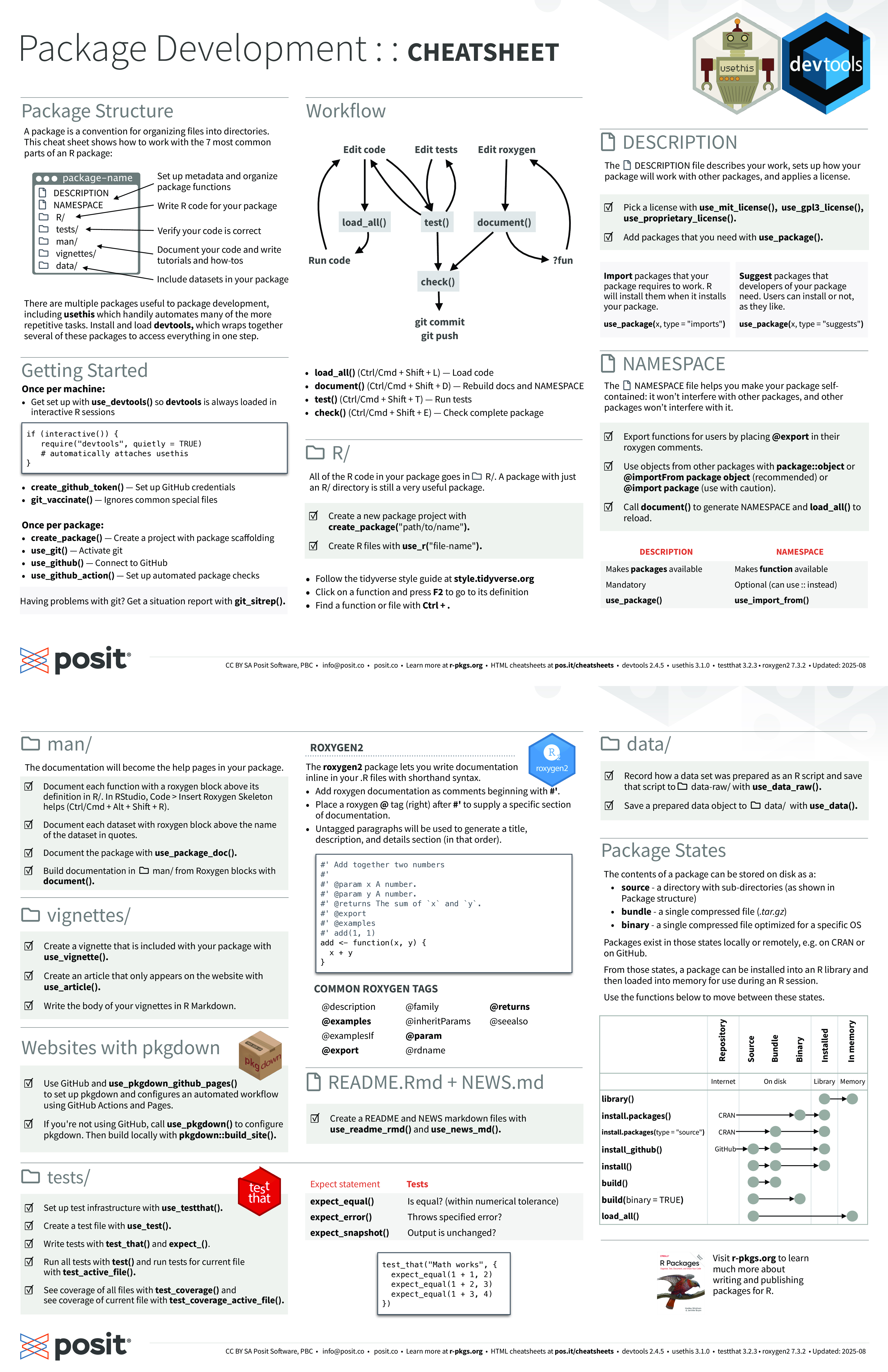
The core loop of package development (edit code, load and run it, run tests, update documentation, check) is well captured by the Posit package development cheat sheet at https://rstudio.github.io/cheatsheets/html/package-development.html.
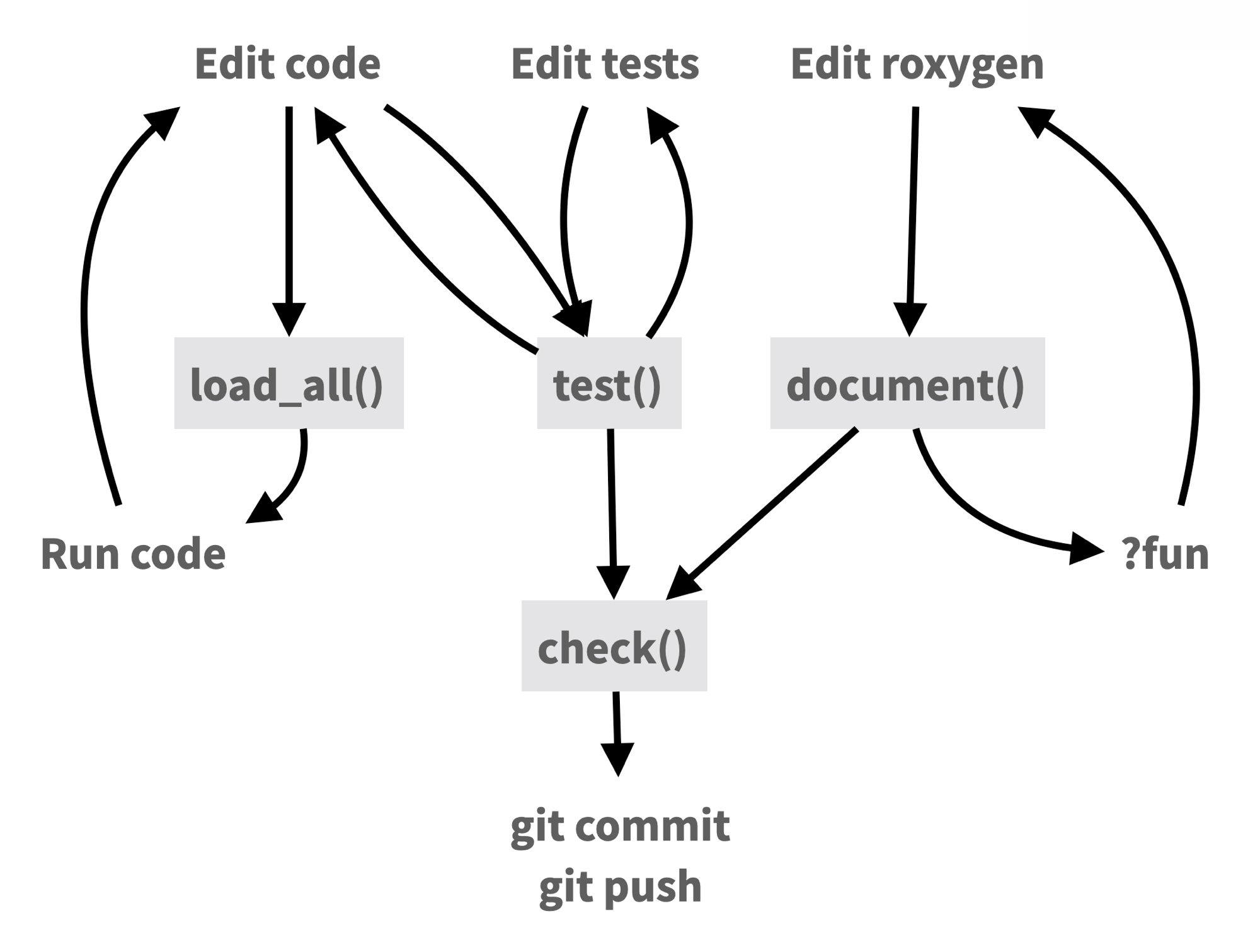
Use the resources below for a complete walkthrough.
14.3 Resources
The definitive reference is R Packages (2nd ed.) by Hadley Wickham and Jennifer Bryan (Wickham and Bryan 2023), available free online. It covers package structure, function documentation, testing, data, and the publication process.
The Posit Package Development cheat sheet is a quick reference for the devtools and usethis commands used throughout development.
In January 2026, I gave a two-hour workshop on R package development in Positron covering this workflow end to end: package structure, writing and documenting functions, exported package data, programming with dplyr, unit tests with testthat, code coverage with covr, continuous integration with GitHub Actions, and a pkgdown documentation site. I also demonstrated using Positron Assistant with Claude in a few places.
All materials are available:
- Package documentation site: https://stephenturner.github.io/rpkgdemo/
- Full tutorial: https://stephenturner.github.io/rpkgdemo/articles/rpkgdemo
- Source code: https://github.com/stephenturner/rpkgdemo
- Recording: https://www.youtube.com/watch?v=hc_RwZx3wNE
Finally, the Writing R Extensions manual is the official reference for package structure and metadata. It is a bit dry, but it is the source of truth for how packages work internally. I’d recommend starting with the R Packages book and asking your favorite AI for help when you run into trouble, but the R Extensions manual is the detailed authoritative guide and is there when you need it.